Courses / AI Fundamentals / Lesson 1 of 6
What Generative AI Actually Is
What generative AI does, what it doesn't do, and how to decide where it belongs in your work.
Start with an example
Maria owns a small cleaning company in Chicago. Every Monday she writes the same kind of email: a reminder to clients about the week’s schedule, any changes, and a friendly note about payment. It takes her about 40 minutes, because she rewrites it from scratch each time.
One Monday she opens an AI tool and types:
“Write a friendly reminder email to my cleaning clients about this week’s schedule. Thursday’s visits move to Friday because of the holiday. Remind them payment is due within 7 days. Keep it under 120 words.”
About ten seconds later she has a clean, polite draft. She fixes one detail (the AI wrote “Wednesday” in one spot), adds her signature, and sends it. Forty minutes became five.
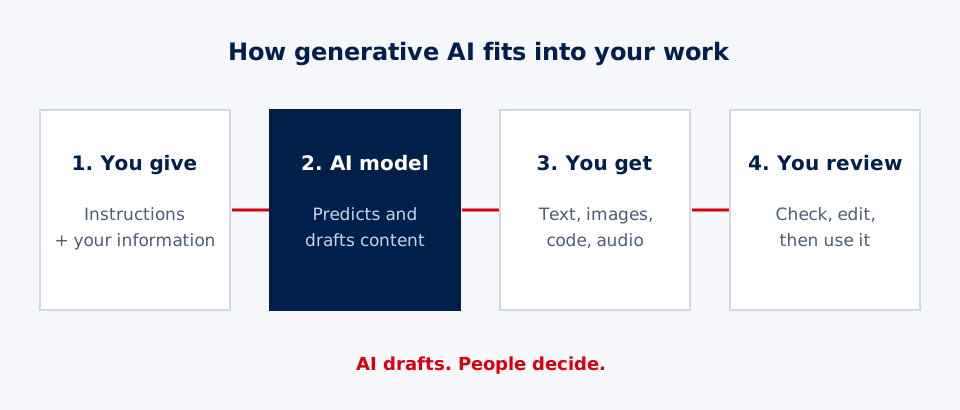
Notice what happened. The AI did the typing. Maria did the thinking: she knew what had changed, she spotted the mistake, and she decided when it was ready. That split between the machine and the person is the most important idea in this whole course.
So what is generative AI?
Generative AI is software that creates new content when you give it instructions. Depending on the tool, it can produce:
- Text: emails, reports, summaries, social posts, lesson plans
- Images: illustrations, product mockups, flyers, logos to start from
- Audio: voiceovers, music, sound effects
- Video: short clips from a description or a still photo
- Code: small programs, spreadsheet formulas, website snippets
The key word is generative. Most software you’ve used before finds or sorts things that already exist. A search engine finds web pages. A spreadsheet calculates with numbers you typed in. Generative AI makes something new each time you ask, even if you ask the same question twice.
Popular tools include ChatGPT, Claude, Gemini, and Microsoft Copilot for text, and tools like Midjourney, Adobe Firefly, and others for images and video. The brands change quickly, but the core idea stays the same: you describe what you want, and the AI drafts it.
What it is good at
Generative AI shines at work that is mostly about language and structure:
| Strength | Example |
|---|---|
| First drafts | A job posting, a proposal intro, a thank-you note |
| Summaries | Turning 12 pages of meeting notes into 6 bullet points |
| Rewrites | Making a stiff paragraph sound friendly, or shortening it by half |
| Translation and simplifying | Explaining an insurance letter in plain English |
| Brainstorming | Twenty possible names for an event, or questions to ask a vendor |
| Structure | An outline, a checklist, a step-by-step guide |
These tasks share something: a good human could do them, but they take time and energy. AI gives you a head start so you can spend your effort on judgment instead of typing.
What it is not
It’s just as important to know the limits. Most AI mistakes happen because someone expected the tool to be something it isn’t.
- It is not a search engine. By default, it predicts likely words instead of looking up facts. It can sound completely sure and still be wrong. (Lesson 2 explains why.)
- It is not a decision-maker. It can suggest options and explain trade-offs. A person decides, especially when money, health, safety, or someone’s job is involved.
- It does not know your situation unless you tell it. It doesn’t know your prices, your customers, or what happened in last week’s meeting. If a detail matters, you have to put it in the prompt.
- It is not a person. It can sound warm and understanding, but it has no memory of you between conversations unless the tool is set up for that, and it has no real stake in your success.
The mindset that works: a fast new assistant
Think of generative AI as a fast, eager new assistant on their first day. They work quickly and never get tired. They also don’t know your business, sometimes guess when they should ask, and need clear instructions.
You wouldn’t let a brand-new hire send a contract to a client without reading it first. The same rule applies here.
AIH rule of thumb: AI drafts. People decide.
We turn that rule into a simple three-step pattern you’ll use throughout these courses:
- Draft: The AI produces a first version from your instructions.
- Decide: A person checks facts, tone, and fit, and edits or rejects it.
- Deliver: Only then does the work go out to a customer, a coworker, or the public.
Skipping step 2 is where nearly every embarrassing AI story begins.
How to choose your first uses
Not every task is a good fit. A simple way to decide is to ask two questions about any task:
- How often do I do this? Daily and weekly tasks pay off fastest, because the time you save adds up.
- How bad is a mistake? If an error would be mildly awkward, the risk is low. If it could hurt someone, cost real money, or break a law, the risk is high.
Put those together and you get a quick guide:
| Low risk | High risk | |
|---|---|---|
| Frequent | Start here: reminders, summaries, social post drafts | Draft with care: AI drafts, careful review every time |
| Rare | Fine to try: brainstorming, one-off flyers | Person in charge: legal, medical, financial decisions |
Maria’s schedule email sits in the top-left box: she sends it every week, and a small mistake is easy to fix. That’s why it was a perfect first use.
A worked example: three tasks, three decisions
Imagine you manage a small community health clinic’s front office. Here are three tasks on your list:
- Task A: Rewrite the “What to bring to your first visit” handout in plainer language. You update it a few times a year. Mistakes are low risk because a nurse reviews it before printing. Good fit: let AI draft, then review.
- Task B: Write the weekly staff newsletter. Frequent, low risk. Great fit: AI drafts from your bullet notes; you add the personal touches.
- Task C: Decide which patients get the limited same-day appointments. That’s a judgment about people’s health and fairness. Not a fit for AI decisions. At most, AI could help you organize the request list, but a person makes the call.
Same tool, three different answers. Learning to sort tasks this way is a skill you’ll keep using long after the tools change.
Think deeper: from following rules to learning patterns
For most of its history, AI ran on rules people wrote by hand: if a customer types “refund,” send it to billing. Those systems were predictable, but they broke the moment something happened that nobody planned for.
Then came machine learning. Instead of writing rules, engineers showed computers millions of examples and let them find the patterns. That’s how spam filters, Netflix recommendations, and fraud alerts work. But those systems mostly sorted things that already existed: spam or not spam, likely to buy or not.
Generative AI flips the direction. It doesn’t just label an email; it writes a new one. Two things made that possible: a 2017 design called the transformer, which can look at how every word in a passage relates to every other word, and enough computing power to train it on a huge amount of text.
Here’s the trade-off worth remembering: rules are rigid but predictable. Learned patterns are flexible but never fully predictable. That single trade-off is why human review still matters, no matter how good the tools get.
Questions to sit with:
- Would you rather use a tool that is always predictable but often unhelpful, or one that is usually helpful but sometimes wrong? Does your answer change if the task is a birthday card versus a medical form?
- If AI learned from patterns in what people have written, whose voices and habits do you think it learned the most from?
Practice: find your first win
- List five tasks you do every week that involve writing, summarizing, or organizing information.
- Rate each one for risk: Low, Medium, or High.
- Pick one frequent, Low-risk task.
- Ask an AI tool to draft it. Include the key details it would need, such as who it’s for and any facts that changed.
- Edit the draft, and keep track of what you changed.
- Reflect: Did it save time? What did you have to fix? Those fixes tell you what to include in your instructions next time.
In the next lesson, you’ll see how these models actually produce their answers, without any math, and why that explains both their strengths and their mistakes.
Try it
Make a two-column list. On the left, write five tasks you do every week. On the right, rate each one Low, Medium, or High for how much damage a mistake would cause. Circle the tasks that are frequent and Low risk. Pick one, have an AI tool draft it, and write down three things you had to change. That list shows where your judgment still matters.
Key takeaways
- Generative AI creates new content (text, images, audio, video, and code) from your instructions.
- It produces a strong first draft, not a final answer. A person still checks the work.
- The best early uses are repeat tasks with low risk: emails, summaries, outlines, and rewrites.
- Use the Draft, Decide, Deliver pattern: AI drafts, a person decides, then the work is delivered.
- Judge a task by two questions: how often do I do it, and how bad is a mistake?
Pass the knowledge check to complete this lesson.