Courses / AI Images & Video / Lesson 2 of 7
Part 2: Make Your Own Collectible Action Figure
Turn your own photo into a premium collectible toy box, complete with your name, title, accessories, and tagline, and learn how one detailed prompt controls every part of a complex image.
Start with an example
Here’s a real AI-generated image: a premium collectible toy box of Rick Pride, Chief Artificial Intelligence Officer of Applied Intelligence Holdings.
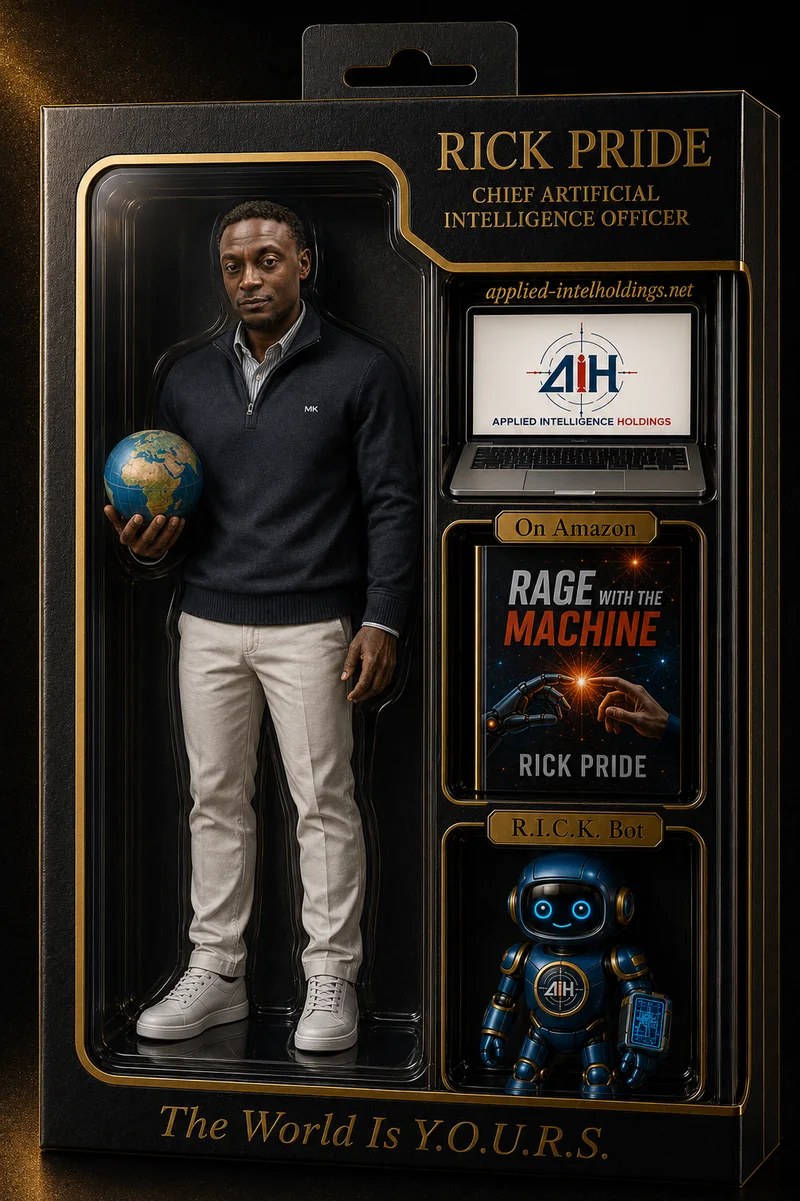
Look closely. This isn’t one idea. It’s about 20 separate details working together: the box material, the hook at the top, the clear window, the outfit, the globe, three accessories in their own compartments, gold label plaques, a name, a title, a website, a tagline, and studio lighting with reflections on the plastic.
Every one of those details came from the prompt. In this lesson, you’ll take the prompt apart, see how it was corrected to match the final image, and then build one of yourself.
The original prompt vs. the final image
Here’s the prompt Rick originally wrote (lightly trimmed):
“A hyperrealistic premium toy box mockup… black leather texture and elegant gold foil accents… The figure is wearing a black blazer, white pants, and white sneakers… In my left hand I am holding a globe… accessories: a sleek laptop, my eBook, ‘Rage with the Machine,’… and a little autonomous robot… display the brand name in gold foil: ‘RICK PRIDE’, and below it the role: ‘CHIEF ARTIFICIAL INTELLIGENCE OFFICER’.”
Now compare it to the image. Some things don’t match:
| The prompt said | The image shows |
|---|---|
| Black blazer | Black quarter-zip sweater over a collared shirt |
| White pants | Cream, off-white pants |
| Globe in the left hand | Globe in his right hand |
| Accessories “neatly arranged” | Three stacked compartments, each with a gold label plaque |
| (not mentioned) | “applied-intelholdings.net” above the laptop |
| (not mentioned) | The AIH logo on the laptop screen |
| (not mentioned) | “On Amazon” above the book, “R.I.C.K. Bot” above the robot |
| (not mentioned) | The tagline “The World Is Y.O.U.R.S.” in gold script along the bottom |
Some of these came from follow-up edits, some from the uploaded photo and book cover, and some the AI chose on its own. The image turned out great, but the prompt no longer describes it. If Rick reused the original prompt next year, he’d get a blazer.
Think about it: When an AI adds something you didn’t ask for, and you like it, is that a lucky accident or a skill? What should you do so you can get it again?
The corrected prompt
Here’s the prompt rewritten to match what’s actually in the image. Notice how it’s organized from the outside in: box → figure → accessories → text → lighting → format.
A hyperrealistic premium collectible toy box mockup, front-facing, standing upright
against a dark black-and-gold background with a soft golden glow.

The box has a matte black textured finish with gold foil trim and a hanging hook tab
at the top center.

On the left, behind a large clear plastic blister window, is a full-body action figure
of the person in the uploaded photo, shown head to toe, with a face that closely matches
the photo. The figure wears a black quarter-zip sweater over a light collared shirt,
cream-colored pants, and white sneakers. In his right hand he holds a small globe.

On the right, in three separate stacked compartments, each with a small gold label plaque,
are accessories:
1. A silver laptop with the uploaded AIH logo on the screen, with
   "applied-intelholdings.net" in gold above it
2. The uploaded book cover, "Rage with the Machine," labeled "On Amazon"
3. A small blue-and-gold friendly robot, labeled "R.I.C.K. Bot"

In the top right corner, in large gold foil serif letters: "RICK PRIDE". Below it, smaller:
"CHIEF ARTIFICIAL INTELLIGENCE OFFICER".

Along the bottom of the box, in elegant gold script: "The World Is Y.O.U.R.S."

Realistic studio lighting, glossy reflections on the plastic window, crisp metallic foil
details. It must look like a real premium collectible product photo. Vertical 2:3 format.
No other text or logos.
What changed, and why it matters
- Accuracy: The outfit, hand, and colors now match the image, so the prompt is a reliable recipe.
- Layout: “Three separate stacked compartments, each with a label plaque” tells the AI exactly how to arrange the right side.
- Text in quotes: Every printed word is spelled out in quotation marks. That’s the best way to reduce misspellings.
- Uploads named: The prompt says which uploaded image goes where (photo → face, logo → laptop, cover → book).
- An Avoid line: “No other text or logos” stops the AI from adding random words or real brand logos.
Your turn: the template
Now make one of yourself. Replace every [PLACEHOLDER] with your own details.
A hyperrealistic premium collectible toy box mockup, front-facing, standing upright
against a dark [COLOR 1]-and-[COLOR 2] background with soft spotlight glow.

The box has a matte black textured finish with [COLOR 2] foil trim and a hanging hook tab
at the top center.

On the left, behind a large clear plastic blister window, is a full-body action figure of
the person in the uploaded photo, shown head to toe, with a face that closely matches the
photo. The figure wears [OUTFIT: top, layers, pants, shoes]. In their [right/left] hand
they hold [ITEM IN HAND].

On the right, in three separate stacked compartments, each with a small [COLOR 2] label
plaque, are accessories:
1. [ACCESSORY 1], labeled "[LABEL 1]"
2. [ACCESSORY 2], labeled "[LABEL 2]"
3. [ACCESSORY 3], labeled "[LABEL 3]"

In the top right corner, in large [COLOR 2] foil serif letters: "[YOUR NAME]".
Below it, smaller: "[YOUR TITLE OR ROLE]".

Along the bottom of the box, in elegant [COLOR 2] script: "[YOUR TAGLINE]".

Realistic studio lighting, glossy reflections on the plastic window, crisp metallic foil
details. It must look like a real premium collectible product photo. Vertical 2:3 format.
No other text or logos.
How to fill in the placeholders
| Placeholder | Ask yourself | Examples |
|---|---|---|
| [COLOR 1] / [COLOR 2] | What colors represent me, my team, or my brand? | navy and silver; black and gold; green and white (school colors) |
| [OUTFIT] | What do I actually wear when I’m at my best? | team jersey, jeans, high-tops; chef’s coat and apron; hoodie, joggers, running shoes |
| [ITEM IN HAND] | What object says what I do? | a basketball, a paintbrush, a microphone, a stethoscope, a wrench |
| [ACCESSORY 1–3] | What three tools, achievements, or symbols tell my story? | a laptop with my logo, a trophy, a sketchbook, my first product, a camera |
| [LABEL 1–3] | What short label explains each one? (2–3 words) | “Team Captain,” “My Brand,” “Est. 2026” |
| [YOUR NAME] | How do I want my name to appear? | your full name or nickname |
| [YOUR TITLE OR ROLE] | What role do I own, now or in the future? | “Future Engineer,” “Founder & CEO,” “Head Chef,” “Varsity Point Guard” |
| [YOUR TAGLINE] | What one line sums up my mindset? Keep it under six words. | “Built Different,” “Create Every Day,” “Lead With Purpose” |
Tip: Before you write, do what you did in the Try It: list everything you want someone to see. If it’s not on your list, it probably won’t make it into your prompt.
Before you upload: protect your likeness
Your face is personal data. Treat it that way.
- Use your own photo, or a photo of someone who has clearly said yes. Never use a classmate’s, coworker’s, or celebrity’s photo without permission.
- Choose a clear, well-lit photo facing the camera. Better input means a closer match.
- Check the tool’s privacy settings. Some tools may keep uploaded images or use them for training. Use an approved tool if this is for school or work.
- Leave out private details like your home address, school ID, or phone number on the box.
- Skip real brand logos you don’t own (on clothes or accessories). Use your own logo, or none.
Steer with follow-ups
Your first result will be close, not perfect. Fix one thing at a time with Keep / Change:
- “Keep everything the same. Change only the face to match my uploaded photo more closely.”
- “Keep the box and figure. Change the text ‘Futur Engineer’ to exactly: ‘Future Engineer’.”
- “Keep the layout. Change the second accessory to a gold trophy labeled ‘State Champs’.”
- “Keep everything. Make the figure’s sneakers white instead of gray.”
If the text keeps coming out misspelled, shorten it, or fix it afterward in an editor like Canva.
Think deeper: why one image can hold so many instructions
Image models don’t read your prompt the way a person reads a checklist. A text encoder turns your words into a set of meanings, and the model tries to satisfy all of them at once as it builds the picture out of noise. That’s why the order and grouping of your prompt matter: details that are grouped together (“three stacked compartments, each with a label”) tend to stay together in the image.
It’s also why long prompts sometimes drop details. When the model has 20 things to satisfy, it may “forget” the least important ones. The fix isn’t always a longer prompt. It’s a clearer one, plus a follow-up for whatever got missed.
And notice what this project really is: a personal brand in a box. To fill in the template, you had to decide what you stand for, what three things represent you, and what your one-line mindset is. The AI made the picture. You made the meaning.
Questions to sit with:
- If you could only choose three accessories to represent who you are, what would they be, and what does that choice say about what you value?
- Should an AI-generated image of a real person always be labeled as AI? When would it matter most?
Project
Make a collectible action figure box of yourself:
- Fill in every placeholder in the template.
- Upload a clear photo of yourself.
- Generate the image.
- Improve it with at least two Keep / Change follow-ups.
- Save your final image and your final prompt, updated to match what you actually got.
- Reflect: In two sentences, which placeholder changed the result the most?
Assignment credit: [CREDIT GOES HERE]
Prompt template
A hyperrealistic premium collectible toy box mockup, front-facing, standing upright against a dark [COLOR 1]-and-[COLOR 2] background with soft spotlight glow.

The box has a matte black textured finish with [COLOR 2] foil trim and a hanging hook tab at the top center.

On the left, behind a large clear plastic blister window, is a full-body action figure of the person in the uploaded photo, shown head to toe, with a face that closely matches the photo. The figure wears [OUTFIT: top, layers, pants, shoes]. In their [right/left] hand they hold [ITEM IN HAND].

On the right, in three separate stacked compartments, each with a small [COLOR 2] label plaque, are accessories:
1. [ACCESSORY 1], labeled "[LABEL 1]"
2. [ACCESSORY 2], labeled "[LABEL 2]"
3. [ACCESSORY 3], labeled "[LABEL 3]"

In the top right corner, in large [COLOR 2] foil serif letters: "[YOUR NAME]". Below it, smaller: "[YOUR TITLE OR ROLE]".

Along the bottom of the box, in elegant [COLOR 2] script: "[YOUR TAGLINE]".

Realistic studio lighting, glossy reflections on the plastic window, crisp metallic foil details. It must look like a real premium collectible product photo. Vertical 2:3 format. No other text or logos.
Try it
Before you write your own prompt, look at the example image and list everything you can see: colors, materials, clothing, items, every word of text, and lighting. Then compare your list to the corrected prompt. What did you notice that a first-time prompt writer would probably leave out?
Your project
Make a collectible action figure box of yourself. Fill in every placeholder in the template, upload a clear photo of yourself, and generate it. Then improve it with at least two follow-up prompts using Keep / Change. Save your final image and your final prompt, and write two sentences on which placeholder changed the result the most.
Key takeaways
- A complex image is just a stack of simple instructions: box, figure, outfit, accessories, text, lighting, and format.
- Describe what you actually want to see. If the prompt says 'blazer' but you want a sweater, the AI will follow the prompt, not your intention.
- Spell out every word you want printed, in quotes, and keep text short. AI still misspells long text.
- Use your own photo, or one you have clear permission to use. Your face is personal data.
- Small, specific details (a label plaque, a hook, a tagline) are what make the image look like a real product.
Finish your project and pass the knowledge check to complete this lesson.